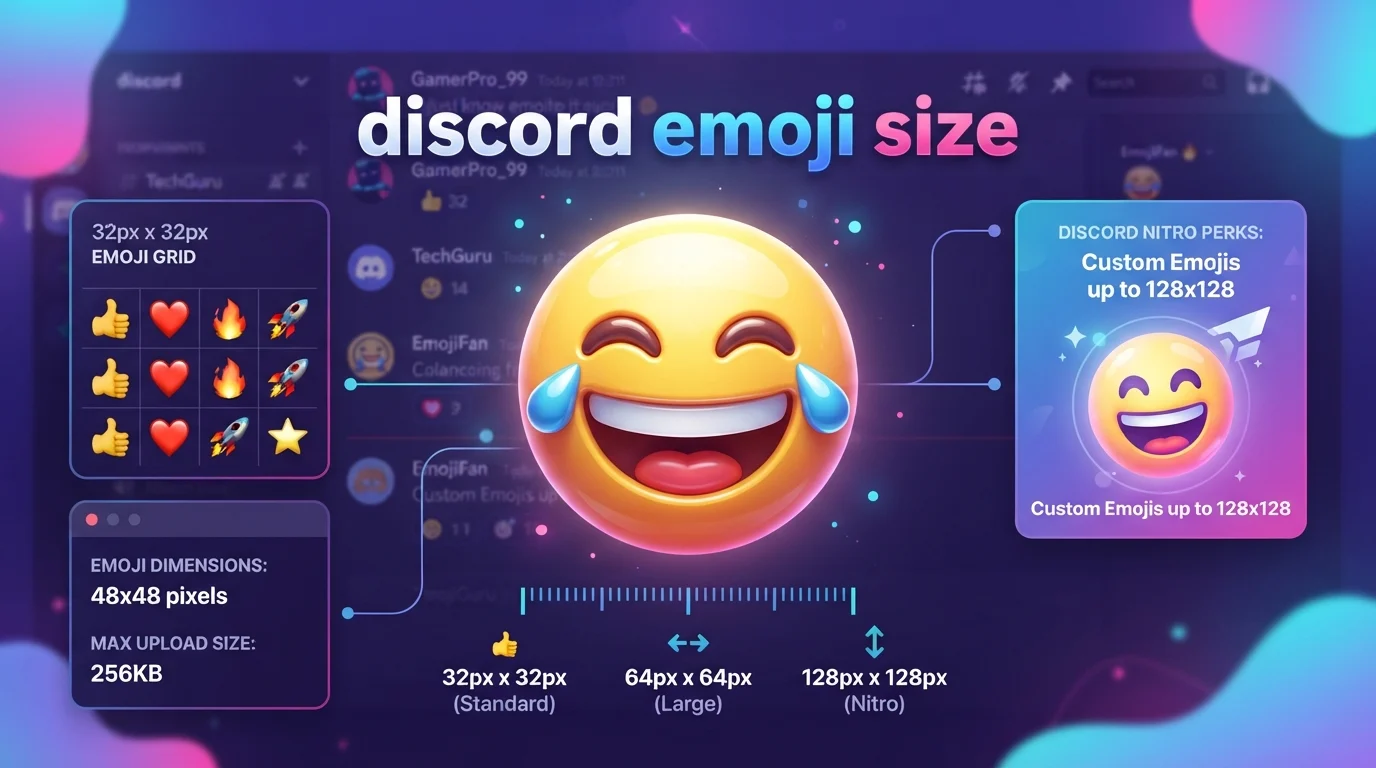
Discord emoji size matters when you want custom emojis to look sharp and readable in chat. Discord recommends uploading custom emoji assets at up to 128 × 128 pixels. Its support documentation says uploaded emojis are resized to 32 × 32 pixels for display and that the file should be under 256 KB. Discord supports JPEG, PNG, GIF, and WEBP files.
The 128 × 128 size is a practical starting point, not a rule that every image must follow. Discord’s newer Emoji Studio can resize and crop uploads, and Discord says larger files may be compressed. This guide explains Discord emoji dimensions, file limits, supported formats, display size, animated emoji requirements, and tips for creating clean emojis that remain recognizable.
Quick Answer
The recommended Discord custom emoji size is 128 × 128 pixels, while Discord’s support documentation says custom emojis are resized to 32 × 32 pixels for display. The file should generally be under 256 KB. Discord supports JPEG, PNG, GIF, and WEBP for custom emoji uploads.
What Is the Best Discord Emoji Size?
For a custom Discord emoji, 128 × 128 pixels is the practical size to use when preparing your artwork.
This gives you enough resolution to create a clean image before Discord reduces it for normal display. Discord’s current support documentation says custom emojis can be uploaded at sizes up to 128 × 128 pixels and are resized to 32 × 32 pixels.
A simple starting specification is:
| Requirement | Recommended Specification |
|---|---|
| Emoji dimensions | 128 × 128 pixels |
| Normal display size | 32 × 32 pixels |
| File size | Under 256 KB |
| Static formats | JPEG, PNG, WEBP |
| Animated format | GIF |
| Shape | Square |
| Design priority | Clear at small size |
For most creators, 128 × 128 PNG is a convenient starting point, especially when the artwork needs transparency.
Does Discord Emoji Size Have to Be 128 × 128?
Not necessarily.
Discord’s newer upload experience allows you to resize, crop, rotate, and zoom your emoji during the upload process. Discord also explains that larger or smaller images can work and describes 128 × 128 as the optimal size rather than an absolute requirement.
That means you do not always need to manually create an image at exactly 128 × 128 pixels before uploading.
Still, designing around 128 × 128 pixels is useful because it gives you a predictable canvas and enough detail to create an emoji that remains recognizable after resizing.
What Size Does a Discord Emoji Display At?
Discord’s support documentation states that custom emojis are resized to 32 × 32 pixels for display.
This is why a detailed image can look good at its original size but become difficult to understand when used as a small emoji.
For example, imagine a custom emoji containing:
- A large face
- Tiny text
- Several small objects
- Thin decorative lines
- Multiple colors
At 128 × 128 pixels, those details may appear clear. At a much smaller display size, the tiny elements can disappear.
The best Discord emojis therefore focus on a simple central shape or expression.
Why 128 × 128 Pixels Works Well
A 128 × 128 canvas gives designers room to create a clean emoji before Discord scales it down.
It works particularly well for:
- Facial expressions
- Reaction faces
- Character heads
- Simple objects
- Logos you have permission to use
- Community-specific reactions
- Short visual jokes
- Animated emoji artwork
The key is not to fill every pixel with detail.
A strong custom emoji should still make sense when viewed at a much smaller size.
Discord Emoji File Size Limit
Discord’s current support documentation says custom emoji files should be under 256 KB.
Discord’s official blog provides an important clarification: the current upload experience can resize and crop images, and Discord says it can compress files that are larger than the usual 256 KB guideline.
So there is a useful distinction:
Best practice: Keep your finished emoji under 256 KB.
Upload behavior: Discord’s newer tools may handle some larger files automatically.
Keeping the file small is still helpful because it gives you more control over the final result instead of relying heavily on automatic compression.
What File Formats Does Discord Support for Emojis?
Discord currently supports several image formats for custom emoji uploads.
These include:
- PNG
- JPEG
- GIF
- WEBP
Discord lists these formats in its current custom emoji documentation.
For a static emoji, PNG is often a convenient choice when you want clean edges and transparency.
For animated custom emojis, GIF is the relevant format supported by Discord’s documentation.
Static vs. Animated Discord Emoji Size
Discord supports both static custom emojis and animated custom emojis.
The same general sizing guidance applies to animated custom emojis, with 128 × 128 pixels serving as the recommended dimension.
The bigger difference is the file format and server availability.
Static emojis can use formats such as PNG, JPEG, and WEBP.
Animated emojis use GIF files and require the additional animated emoji availability associated with Nitro or Nitro Basic. Discord currently states that servers receive up to 50 additional animated emoji slots with Nitro or Nitro Basic.
Discord Emoji Size vs. Regular Unicode Emoji
A custom Discord emoji and a standard Unicode emoji are not exactly the same thing.
A Unicode emoji such as 😂, ❤️, or 🔥 is a standardized character that can be rendered by Discord and other platforms.
A custom emoji is an uploaded image created for a Discord server.
That means you generally do not resize a standard Unicode emoji yourself. Its appearance is controlled by the platform and the font or emoji artwork being used.
Custom emojis are different because you control the original artwork before Discord processes it.
Related Emojis and Their Discord Use
The following examples help show how different emoji types can be used in Discord conversations. Standard Unicode emojis do not have custom upload dimensions like server emojis, while custom emojis are uploaded assets.
| Emoji | Official Name | Common Meaning | Tone | Where or When It Is Used |
|---|---|---|---|---|
| 😂 | Face with Tears of Joy | Strong laughter | Playful | Reactions, jokes, funny messages |
| ❤️ | Red Heart | Love, support, appreciation | Warm | Messages, reactions, community posts |
| 🔥 | Fire | Excitement, praise, something impressive | Energetic | Gaming, reactions, compliments |
| 👍 | Thumbs Up | Approval or agreement | Neutral, positive | Quick replies and confirmations |
| 👀 | Eyes | Attention, curiosity, watching | Playful, curious | Reactions and teasing |
| 🎉 | Party Popper | Celebration | Festive | Events, achievements, announcements |
| 💀 | Skull | Extreme laughter, shock, or disbelief | Dramatic, humorous | Jokes and exaggerated reactions |
| 🤔 | Thinking Face | Thinking, uncertainty, questioning | Curious | Discussions and replies |
These standard Unicode emojis can appear in Discord messages without being uploaded as custom server emojis.
Custom emojis, by contrast, are image assets that your server can add and manage.
Discord Emoji Size Compared With Server Icons
It is easy to confuse Discord emoji dimensions with other image specifications.
A custom emoji is not the same thing as a server icon.
Discord’s documentation lists different requirements for server icons. For example, Discord states that server icons have a minimum size of 128 × 128 pixels.
So if you are designing a Discord asset, first decide what you are creating:
Custom emoji: Designed for small inline reactions and messages.
Server icon: Represents an entire Discord server and has different display requirements.
Role icon: A separate type of visual asset with its own requirements.
Using the wrong specification can lead to unnecessary resizing or quality loss.
How to Make a Discord Emoji That Looks Clear
Good sizing is only part of the process.
Because Discord can display a custom emoji at a small size, the artwork should be designed for readability.
Keep the Main Subject Large
Put the important feature near the center.
For a reaction face, make the eyes, mouth, or expression large enough to remain recognizable.
Avoid Tiny Text
Text that looks readable at 128 × 128 pixels may become impossible to read when the emoji is displayed smaller.
If the message needs words, let the Discord message provide the words instead.
Use Strong Shapes
Simple outlines and clear silhouettes tend to remain easier to recognize than extremely detailed artwork.
Leave Enough Space
Do not push the artwork right against every edge of the canvas.
A little breathing room can help the emoji maintain a clean appearance after resizing.
Test It at a Small Size
Before finalizing your emoji, preview the artwork at approximately its expected display size.
If the expression or object becomes unclear, simplify the design.
Does Discord Automatically Resize Emojis?
Yes.
Discord’s current support documentation says uploaded custom emojis are resized to 32 × 32 pixels for display.
Discord’s newer Emoji Studio also provides tools for resizing, rotating, and zooming an uploaded image before you submit it.
This means you do not need to perform every resizing step manually.
However, automatic resizing cannot fix a design that is fundamentally too complicated. If the original image contains tiny details, those details may still disappear after reduction.
Can You Upload a Larger Discord Emoji?
Discord’s official blog says larger images can be uploaded through the current experience, with Discord handling resizing and compression. It still identifies 128 × 128 pixels as the optimal emoji dimension and 256 KB as the standard file-size guideline.
For predictable results, preparing the artwork at 128 × 128 pixels and keeping it under 256 KB remains a sensible approach.
How Many Custom Emojis Can a Discord Server Have?
Discord currently states that a server can have up to 50 static custom emojis by default.
Servers with Nitro or Nitro Basic can receive an additional 50 animated custom emoji slots, giving them up to 100 custom emoji slots when those categories are combined.
The number of available slots is separate from the pixel dimensions of each emoji.
In other words, making an emoji smaller does not create additional emoji slots.
How to Upload a Custom Emoji to Discord
To upload a custom emoji:
- Open the Discord server where you want to add it.
- Open Server Settings.
- Go to the Emoji section.
- Choose the option to upload an emoji.
- Select your image.
- Adjust the image if needed.
- Give the emoji a valid name.
- Upload it to the server.
Discord also provides Emoji Studio through the desktop and browser emoji picker for supported users, where you can resize, rotate, and zoom an uploaded image before adding it. Discord says Emoji Studio is not currently available on mobile.
You also need the appropriate permission to add custom emojis, such as the Create Expressions permission.
Discord Emoji Naming Rules
Emoji sizing is not the only upload requirement.
Discord states that custom emoji names must contain at least two characters and can use letters, numbers, and underscores.
For example:
:happycat:
:party_time:
:wow123:
A descriptive name makes the emoji easier to identify when using Discord’s emoji picker.
Common Discord Emoji Size Mistakes
Designing only for 128 × 128
A 128 × 128 canvas does not mean every tiny detail will remain visible.
Always consider the smaller display size.
Adding too much text
Small text is one of the easiest details to lose after resizing.
Making the subject too small
If the main character occupies only a small portion of the canvas, it may become difficult to recognize.
Ignoring the file size
A high-resolution image with unnecessary detail can become much larger than needed.
Confusing emoji dimensions with server icon dimensions
A Discord server icon and a custom emoji serve different purposes and should not be designed using the same assumptions.
Text and Reaction Examples Using Discord Emojis
Casual reaction
😂 That was hilarious
Meaning: The standard emoji reinforces laughter.
Showing approval
👍 Looks good to me
Meaning: A quick positive confirmation.
Showing curiosity
👀 Wait, what happened?
Meaning: The emoji adds visual interest and suggests attention.
Community celebration
🎉 We reached 1,000 members!
Meaning: A celebratory reaction suitable for an announcement.
These examples use standard Unicode emojis, but the same principles apply when choosing artwork for custom Discord emojis. A custom reaction should communicate clearly even when displayed at a small size.
Common Questions About Discord Emoji Size
What is the best size for a Discord emoji?
128 × 128 pixels is the recommended starting dimension for custom Discord emojis. Discord’s support documentation says custom emojis are resized to 32 × 32 pixels for display.
What is the Discord emoji file size limit?
Discord’s current support documentation says custom emoji files should be under 256 KB. Its newer blog also explains that the current upload experience can compress larger files.
Can Discord emojis be 256 × 256?
You can upload images that are larger than the recommended 128 × 128 dimensions through Discord’s newer upload experience, which can resize them. However, Discord identifies 128 × 128 as the optimal custom emoji dimension.
What size are Discord emojis when displayed?
Discord’s support documentation says custom emojis are resized to 32 × 32 pixels for display.
What format should a Discord emoji be?
Discord supports JPEG, PNG, GIF, and WEBP for custom emoji uploads. GIF is used for animated custom emojis.
Are Discord emojis square?
A 128 × 128 pixel canvas is square and is the recommended custom emoji dimension. Starting with a square design makes it easier to keep the artwork centered and balanced.
Can Discord resize my emoji?
Yes. Discord’s Emoji Studio can resize, rotate, and zoom uploaded images, and Discord also states that its current system can resize uploads automatically.
Why does my Discord emoji look blurry?
A custom emoji can look blurry when the source artwork is low quality, contains excessive detail, or is heavily compressed during processing. Starting with a clean 128 × 128 design and keeping important shapes simple can help.
What is the best format for a transparent Discord emoji?
PNG is often a practical choice when transparency and clean edges are important. Discord officially supports PNG alongside JPEG, GIF, and WEBP.
Conclusion
For most custom Discord emojis, 128 × 128 pixels is the best starting point. Discord’s current documentation says custom emojis are resized to 32 × 32 pixels for display and recommends keeping the file under 256 KB.
The most important design rule is simple: create an emoji that remains recognizable after it becomes small. Use a clear subject, avoid tiny text, keep important details large, and choose an appropriate file format. Discord’s newer upload tools can handle resizing and compression, but a well-prepared source image gives you more control over the final appearance.
Discover More Post:
- Sleeping Emoji Meaning | What Really Says About Your Mood …
- Yikes Emoji Meaning | Reactions, Uses & Hidden Emotional …
- Sigh Emoji Meaning | The Subtle Emotion Behind Explained …